Chat and Meet basics, and which app for which job
Email, Chat, Meet and Calendar each do one thing well. Learn the rule for picking the right one, and the Chat habits that keep a small team sane.
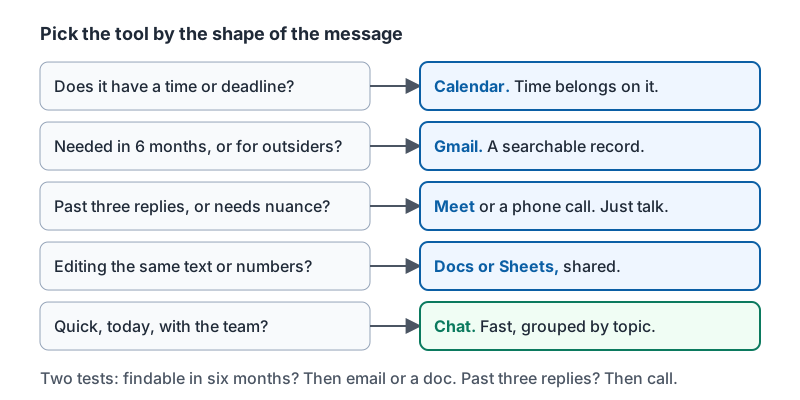
Pick the tool by the shape of the message
| You need to | Use | Because |
|---|---|---|
| Send something formal, to someone outside, or that must be kept (quotes, confirmations, contracts) | Gmail | It is a record, it reaches anyone, and it can be searched for years |
| Ask a quick question, share a photo, or coordinate today’s work with the team | Chat | Fast, grouped by topic, no subject lines |
| Discuss something with nuance, or more than three replies deep | Meet (or a phone call) | Ten minutes of talking beats forty messages |
| Block time, propose times, or put a deadline somewhere visible | Calendar | Time belongs on the calendar, not in a chat thread |
| Work on the same text or numbers together | Docs or Sheets, shared | Comments sit next to the content instead of in a thread |
Two quick tests: Will someone need to find this in six months? Then email or a doc. Has this thread gone past three replies? Then call or Meet.
The table as a set of questions to ask before you type.
Chat: direct messages and spaces
A direct message is a private conversation with one person or a small group. A space is a named room for a topic or team (Front desk, Suppliers, Saturday crew). Spaces keep history, so a new hire can read what happened before they joined.
Good habits for a small team:
- One space per standing topic, not per day. “Ops” and “Orders” beat “Tuesday stuff”.
- Threads keep a space readable. Reply in the thread, not in the main stream.
- Mention people with the at-symbol only when you need them. Mentioning everyone for a non-urgent note trains people to ignore mentions.
- Set your status (Do not disturb, Away) rather than leaving people guessing.
- Pin the things people keep asking for: the Wi-Fi password card, the opening checklist, the vendor contact sheet.
What not to put in Chat: anything a customer or auditor might need later, anything with payment details, and bad news for one person. Those go to email, a shared doc with restricted access, or a conversation.
Productivity educator Scott Friesen’s five-minute tour shows messages, threads, tasks and files inside a Chat space.
Meet: the basics that matter
- Join from the Calendar event, so the agenda is one tap away.
- Mute when not speaking, especially from a shop floor or a car.
- Captions help in noisy places and for anyone who processes text better than speech.
- Present a single tab or window rather than your whole screen, so a notification from another customer does not appear.
- Record only when needed, say so out loud, and store the recording in the shared Drive folder, not your personal one.
- Phone dial-in is in the invite for anyone without a stable connection.
For a two-person check-in, a Chat huddle or a plain phone call is often quicker than a scheduled Meet.
Sorting everyday tasks
| Task | App |
|---|---|
| Send a formal quote to a customer | Gmail |
| Ask the whole front-desk team a quick question | Chat (space) |
| Twenty-minute catch-up with a remote hire | Meet |
| Block Friday afternoon for the inventory count | Calendar |
| Share a photo of the broken printer with the ops group | Chat |
| Propose three possible times for a vendor call | Calendar (appointment schedule or Find a time) |
| Confirm a delivery date in writing with a supplier | Gmail |
| Decide between two layouts with three people, lots of back-and-forth | Meet |
When Chat and email cross
Chat has a forward to inbox option for a message you need to keep. Gmail can open a Chat with the sender from a message. Use them to move a conversation to the right place instead of continuing in the wrong one.
Try it now
Look at the last five work messages you sent across any app. For each one, ask: was that the right tool by the table above? Then create or tidy one Chat space for a topic your team actually coordinates on, and pin the one thing people keep asking for.
Remember: email for records and outsiders, Chat for quick coordination, Meet when a thread passes three replies, Calendar for anything with a time. Threads and a few well-named spaces keep Chat readable.
Checking your progress…