Gems for repeat tasks
A Gem is a saved version of Gemini with your instructions and files baked in. Build one for each job you do every week.
Stop typing the same background
If you give Gemini the same context every time, who you are, how you write, what the rules are, you are doing work the tool should do. A Gem is a custom version of Gemini with standing instructions and reference files already loaded. You open the Gem instead of a blank chat and it starts already knowing your business.
What goes in a Gem
| Part | What it holds | Example |
|---|---|---|
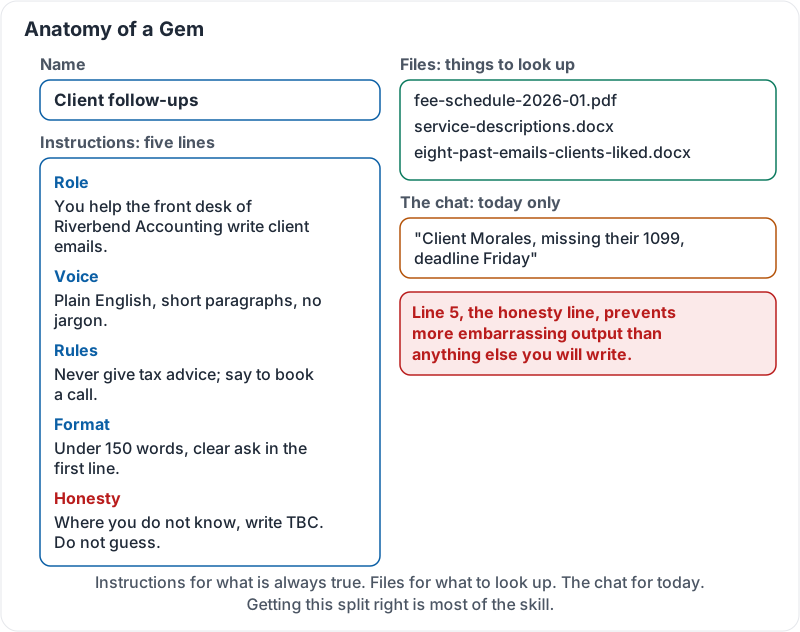
| Name | What the Gem does, in two or three words | “Client follow-ups” |
| Instructions | Who the Gem is, how it writes, what it must never do | “You help the front desk of Riverbend Accounting write client emails. Plain English, short paragraphs, never give tax advice, always say to book a call for specifics. Sign off ‘Riverbend front desk’. Never invent dates or fees; write TBC.” |
| Files | Reference material it should read, not memorise | Fee schedule, service descriptions, your five best past emails |
| The chat | Today’s details only | “Client Morales, missing their 1099, deadline Friday” |
Instructions are for things that are true every time. Files are for things to look up. The chat is for today. Getting this split right is most of the skill.
Writing good instructions
A strong set of Gem instructions has five lines:
- Role: “You help [who] do [what] at [company].”
- Voice: “Plain, warm, short paragraphs, no jargon.”
- Rules: “Never promise a date. Never give medical or legal advice.”
- Format: “Default to under 150 words with a clear ask in the first line.”
- Honesty: “Where you do not know something, say so or write TBC. Do not guess.”
Line 5 does more to prevent embarrassing output than anything else you will write.
A Gem with all four parts filled in:
Sharing Gems
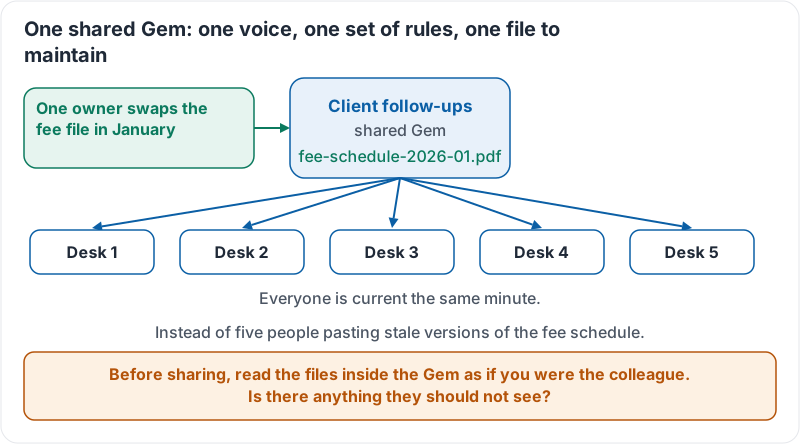
On Workspace plans, a Gem can be shared with colleagues like a document. One well-built “Client follow-ups” Gem gives the whole front desk the same voice and the same rules. It also means one person maintains the fee schedule file instead of five people pasting stale versions.
Before sharing, read the files inside the Gem as if you were the colleague. Is there anything in them they should not see?
Why one shared Gem beats five private copies:
Google Workspace’s short demonstration builds a Gem for a repeat task:
A worked example
Riverbend Accounting’s front desk built one Gem with the five-line instructions above and two files: the fee schedule (dated in the file name) and a document of eight past emails that clients responded well to. Now “Morales, missing 1099, Friday deadline” produces a finished, on-brand email in one go. When fees changed in January, one person swapped the file and every colleague’s Gem was current the same minute.
Try it now
Build one Gem for the task you repeat most. Write the five-line instructions, upload one file, and test it with a one-line request you would normally have to explain at length. Then ask it something the file does not cover and check that it says TBC instead of guessing.
Remember: instructions for what is always true, files for what to look up, the chat for today. Always include the honesty line: say so or write TBC, never guess.
Checking your progress…