Passwords and password managers
One leaked password unlocks every account that shares it. A password manager fixes reuse permanently and makes logging in faster, not slower.
How passwords actually get stolen
Almost nobody “guesses” a password anymore. Passwords are stolen in bulk:
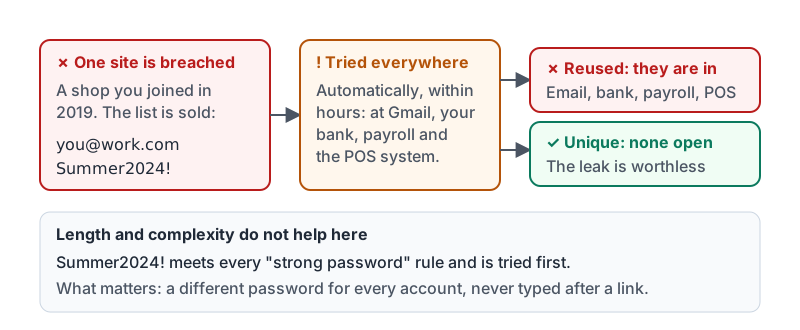
- A website you signed up for years ago is breached. Your email and password are now in a list sold online.
- Criminals try that same email and password on Gmail, Microsoft, your bank, your payroll portal and your point-of-sale system. This is called credential stuffing, and it works because most people reuse passwords.
- Or you type your password into a fake login page reached from a phishing link. Length and complexity do not help at all in that case.
So the two things that matter are: a different password for every account, and never typing a password on a page you reached from a link.
Credential stuffing, step by step: one old breach, tried everywhere.
Why “strong” passwords were the wrong advice
Rules like “eight characters, a capital, a number and a symbol” produced passwords like Summer2024!, which criminals’ tools try first. Changing it every 90 days produced Summer2025!. Neither habit protects you.
What protects you:
| Habit | Why it works |
|---|---|
| Unique password per account | A breach at one site cannot open any other |
| Long (16 or more characters) | Takes far longer to crack if a site’s password database leaks |
| Random, made by a password manager | No patterns, no names, no years, nothing to guess from your social media |
| Changed only when there is a reason | A breach, a phishing click, a shared device. Routine changes just create patterns. |
CISA’s one-minute version of the same advice: long, unique, and kept in a password manager.
Password managers do the remembering
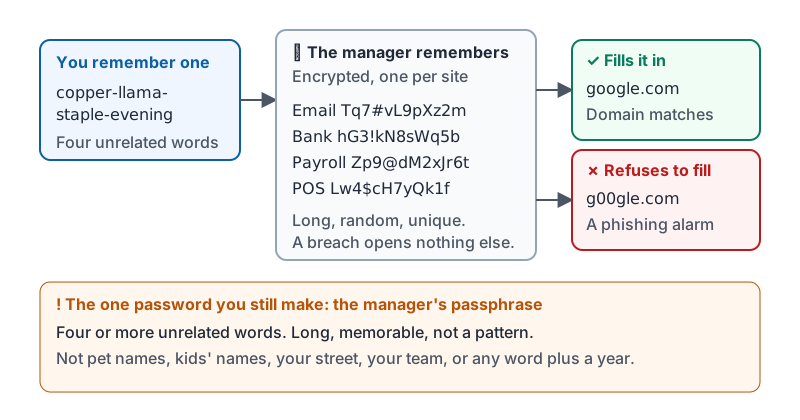
A password manager is an app that creates a long random password for each site, stores it encrypted, and fills it in for you on your phone and computer. You remember one strong passphrase to unlock the manager. Everything else is automatic.
Benefits that people notice in the first week:
- Logging in is faster, because the manager fills the form.
- It will not fill your password on a fake site, because the domain does not match the saved one. That is a built-in phishing alarm.
- It flags passwords that are reused or appear in known breaches.
- When someone leaves the business, shared logins can be changed in one place.
Options include the manager built into your browser or phone, your Google or Apple account’s built-in manager, and dedicated apps. Any of these is far better than a notebook, a spreadsheet, or your memory. If your workplace provides one, use that one so the owner can revoke access when people leave.
How the pieces fit: one passphrase you remember, everything else remembered for you.
The one password you still have to make
The passphrase for your manager (and for your main email account) should be something you can type but nobody could guess. Four or more unrelated words works well: copper-llama-staple-evening. Long, memorable, and not a pattern.
Do not use: pet names, kids’ names, your street, your team, any word plus a year, or anything you have posted online.
Habits that undo everything
| Risky habit | Why it hurts | Instead |
|---|---|---|
| Sharing your login with a coworker “to cover a shift” | Nobody knows who did what, and you cannot take it back | Ask for their own account or a shared manager entry |
| Keeping passwords in a spreadsheet or a sticky note | Anyone who sees the screen or the desk has everything | Put them in the manager |
| Same password for work email and personal shopping sites | One breach opens your work mailbox | Unique per account, always |
| Typing a password after clicking a link in a message | Fake login pages look identical to real ones | Go to the site yourself, or let the manager fill it (it will refuse on a fake site) |
| Answering “security questions” truthfully | Your mother’s maiden name is on genealogy sites | Use random answers stored in the manager |
Try it now
Open your phone’s settings and find the built-in password manager (iPhone: Passwords; Android: Google Password Manager). Look at whether it reports any reused or compromised passwords. If it does, change the one for your email first. Email is the account that resets all the others.
Remember: unique, long, random, stored in a password manager. You remember one passphrase; the manager remembers the rest and refuses to fill it on a fake site.
Checking your progress…